The Dentists & Orthodontists Fix Kit
Built for dentists and orthodontists.
Dental and orthodontic practices produce more than they collect, and the gap is made of small, repeatable misses: denials that come back for the same reason, claims that age out, payments below the contracted fee, patient portions never collected at the chair, card fees nobody totaled, and staff overtime figured wrong. This kit helps you find each one in your own reports, so the people who already run the front office can fix it.
Opens secure checkout. Instant download after payment. 30 days to ask for a refund — refund policy · terms
The 8 leaks it covers
5 you can close it · 2 the other side owes it · 1 a pro decides
- Denied claims never sorted by reason code, so the same denial repeatsWhere to look first: Export every denied or partly paid claim for the last quarter from your practice software or clearinghouse, with the payer, procedure code and reason code.Keep it from coming back: Run the denial report on the same day every month.You can close it
- Claims that aged past the filing window before anyone noticedWhere to look first: List the timely-filing limit in each payer contract you hold.Keep it from coming back: Keep clearinghouse acceptance reports for every batch.You can close it
- Payments posted without being checked against the contracted fee scheduleWhere to look first: Get the current fee schedule for each payer you are in network with.Keep it from coming back: Load each payer's fee schedule into your software so underpayments flag on posting.The other side owes it
- Downgraded or bundled procedures accepted without an appealWhere to look first: Run a report of claims where the payer paid a different, lower code than billed.Keep it from coming back: Attach images and a narrative when you first submit codes that are often downgraded.The other side owes it
- Patient balances not estimated or collected at the visitWhere to look first: For the last quarter, list balances billed to patients after the visit, and how many are still unpaid.Keep it from coming back: Verify benefits the business day before each visit.You can close it
- Card processing cost never worked out as one effective rateWhere to look first: Get your last three merchant statements.Keep it from coming back: Recalculate the effective rate every quarter.You can close it
- Staff overtime and exemption status set by title, not by the rulesWhere to look first: List each team member's title, pay type and weekly hours.Keep it from coming back: Review classifications whenever a role or pay plan changes.You can close it
- No tax set aside from money paid with nothing withheldWhere to look first: Write down which of your pay arrives with no tax taken out: practice profits and owner draws.Keep it from coming back: Move the set-aside the day each payment lands. Put every estimated-tax date your preparer gives you on the calendar in January.A pro decides
Free: one full leak from this kit
No sign-up, no email. Here is leak 1 of 8 exactly as it appears in the kit, so you can see what you get before you buy.
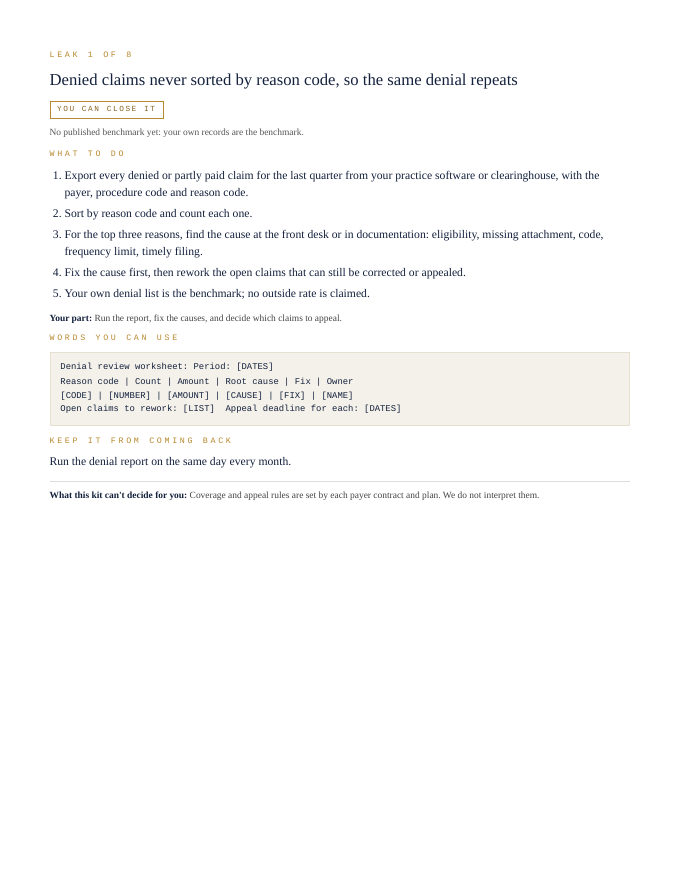
Denied claims never sorted by reason code, so the same denial repeats
You can close it- Export every denied or partly paid claim for the last quarter from your practice software or clearinghouse, with the payer, procedure code and reason code.
- Sort by reason code and count each one.
- For the top three reasons, find the cause at the front desk or in documentation: eligibility, missing attachment, code, frequency limit, timely filing.
- Fix the cause first, then rework the open claims that can still be corrected or appealed.
- Your own denial list is the benchmark; no outside rate is claimed.
Your part: Run the report, fix the causes, and decide which claims to appeal.
Denial review worksheet:

Period: [DATES]
Reason code | Count | Amount | Root cause | Fix | Owner
[CODE] | [NUMBER] | [AMOUNT] | [CAUSE] | [FIX] | [NAME]
Open claims to rework: [LIST]  Appeal deadline for each: [DATES]
Run the denial report on the same day every month.
What this kit can't decide for you: Coverage and appeal rules are set by each payer contract and plan. We do not interpret them.
That's 1 of 8. The other 7 come the same way in the kit: steps, words to send, a habit to keep each one closed.
Opens secure checkout. Instant download after payment. 30 days to ask for a refund — refund policy · terms
What people in this work look up
When dentists and orthodontists go looking for answers, they search things like “dental insurance reimbursement”, “dental billing”, “dental claim denials” and “dental practice overhead”. Those searches turn up forms, averages and other people's numbers. This kit starts from your own records instead: the 8 places money leaks in this work, where to look first and the words to send to close each one.
What you get for each leak
- Numbered steps to close each leak
- Your part, spelled out
- Words you can use: letters and scripts, ready to send (fill in the brackets)
- A habit that keeps each leak from coming back
- An honest line on what the kit can't decide for you
A page from the kit
Questions people ask
Denied claims never sorted by reason code, so the same denial repeats: where do I start?
Start here: Export every denied or partly paid claim for the last quarter from your practice software or clearinghouse, with the payer, procedure code and reason code. To keep it from coming back: Run the denial report on the same day every month.
Claims that aged past the filing window before anyone noticed: where do I start?
Start here: List the timely-filing limit in each payer contract you hold. To keep it from coming back: Keep clearinghouse acceptance reports for every batch.
Payments posted without being checked against the contracted fee schedule: where do I start?
Start here: Get the current fee schedule for each payer you are in network with. To keep it from coming back: Load each payer's fee schedule into your software so underpayments flag on posting.
What it can't decide for you
This kit works from your own records. It doesn't give legal, tax, licensing or financial advice, and it never tells you what to charge. Where a CPA, attorney, insurer or state board makes the call, the kit says so and gets your records ready for them.
14-page PDF · instant download after payment · Code VYR-KIT-DENTISTS-01
Opens secure checkout. Instant download after payment. 30 days to ask for a refund — refund policy · terms
Next step
- Run your free LeakReceipts check — it reads your own receipts and records and shows where money is leaking out, line by line.
- TrueNET — the whole-picture money truth: what you actually keep after every cost, across everything you earn and spend.
Use Jobber or Housecall Pro? Run the free leak check — it reads your job export in your browser and shows the money leaks the software doesn't flag. Nothing is uploaded.