The Gyms & Fitness Studios Fix Kit
Built for gyms and fitness studios.
A gym's revenue is a stack of small recurring charges, and the leaks are just as small and just as recurring: a card that expired and was never updated, a failed draft nobody retried, a chargeback lost because no one answered it, a freeze fee written into the agreement and never charged. None of them shows up as a loss on the books; they show up as members who quietly stopped paying. This kit finds each one in your own billing reports.
Opens secure checkout. Instant download after payment. 30 days to ask for a refund — refund policy · terms
The 11 leaks it covers
8 you can close it · 1 the other side owes it · 2 a pro decides
- Failed membership drafts never retried or followed upWhere to look first: Pull last month's declined and failed payments report from your billing software.Keep it from coming back: Read the failed-payments report every week, not at month end.You can close it
- Expired and replaced cards dropping members because account updater is offWhere to look first: Ask your processor or billing software whether automatic card updating is turned on. Visa calls its service Visa Account Updater; Mastercard has its own.Keep it from coming back: Check the expired-card decline count monthly.You can close it
- Card processing priced as a mystery: nobody knows the real rateWhere to look first: Take one month's processor statement. Divide total fees by total card volume (CALCULATED from your statement).Keep it from coming back: Re-figure your effective rate every quarter.You can close it
- Chargebacks lost by default because nobody answers themWhere to look first: Pull every chargeback from the last 12 months: date, amount, reason code, and whether you responded.Keep it from coming back: One person owns the chargeback inbox and checks it every business day.The other side owes it
- Cancellation terms that confuse members and invite disputesWhere to look first: Read your membership agreement and website as a member would: how do I cancel, how much notice, and is there a fee?Keep it from coming back: Send a written confirmation for every cancellation the day it comes in.You can close it
- Freeze and hold fees in the agreement never chargedWhere to look first: List the members on freeze or medical hold right now.Keep it from coming back: Every freeze gets an end date in the software when it starts.You can close it
- Annual or enhancement fee written in but never billedWhere to look first: Check your agreements for an annual, maintenance or enhancement fee.Keep it from coming back: Schedule every fee in the software at sign-up, not later.You can close it
- Software stack: paying for overlapping tools every monthWhere to look first: List every software charge on your bank and card statements: billing, scheduling, app, marketing, waivers, access control, payroll.Keep it from coming back: Review the software list every six months, a month before the biggest renewal.You can close it
- Trainer and instructor pay not matched to sessions actually deliveredWhere to look first: Pull last month's trainer and class payroll.Keep it from coming back: Reconcile sessions, payroll and package sales every pay period.You can close it
- Trainers and instructors paid as contractors without a classification checkWhere to look first: List everyone you pay by 1099.Keep it from coming back: Re-check classification whenever a role changes.A pro decides
- Equipment purchases expensed or depreciated without asking about timingWhere to look first: List equipment you bought or plan to buy this year, with dates placed in service.Keep it from coming back: Send your CPA the equipment list each quarter.A pro decides
Free: one full leak from this kit
No sign-up, no email. Here is leak 1 of 11 exactly as it appears in the kit, so you can see what you get before you buy.
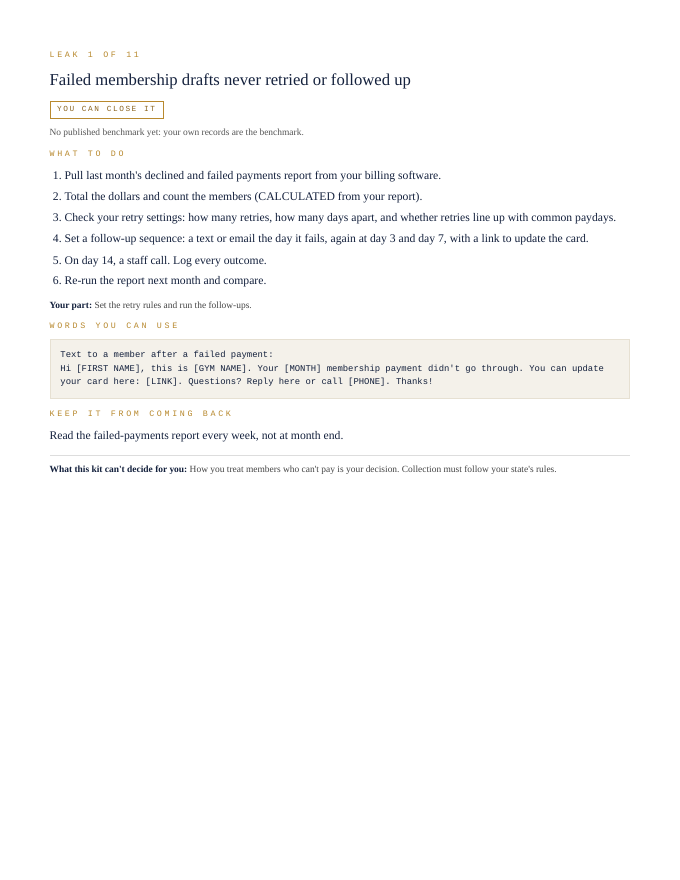
Failed membership drafts never retried or followed up
You can close it- Pull last month's declined and failed payments report from your billing software.
- Total the dollars and count the members (CALCULATED from your report).
- Check your retry settings: how many retries, how many days apart, and whether retries line up with common paydays.
- Set a follow-up sequence: a text or email the day it fails, again at day 3 and day 7, with a link to update the card.
- On day 14, a staff call. Log every outcome.
- Re-run the report next month and compare.
Your part: Set the retry rules and run the follow-ups.
Text to a member after a failed payment:


Hi [FIRST NAME], this is [GYM NAME]. Your [MONTH] membership payment didn't go through. You can update your card here: [LINK]. Questions? Reply here or call [PHONE]. Thanks!
Read the failed-payments report every week, not at month end.
What this kit can't decide for you: How you treat members who can't pay is your decision. Collection must follow your state's rules.
That's 1 of 11. The other 10 come the same way in the kit: steps, words to send, a habit to keep each one closed.
Opens secure checkout. Instant download after payment. 30 days to ask for a refund — refund policy · terms
What people in this work look up
When gyms and fitness studios go looking for answers, they search things like “gym membership software fees”, “gym chargebacks”, “gym owner profit margin” and “fitness studio pricing”. Those searches turn up forms, averages and other people's numbers. This kit starts from your own records instead: the 11 places money leaks in this work, where to look first and the words to send to close each one.
What you get for each leak
- Numbered steps to close each leak
- Your part, spelled out
- Words you can use: letters and scripts, ready to send (fill in the brackets)
- A habit that keeps each leak from coming back
- An honest line on what the kit can't decide for you
A page from the kit
Questions people ask
Failed membership drafts never retried or followed up: where do I start?
Start here: Pull last month's declined and failed payments report from your billing software. To keep it from coming back: Read the failed-payments report every week, not at month end.
Expired and replaced cards dropping members because account updater is off: where do I start?
Start here: Ask your processor or billing software whether automatic card updating is turned on. Visa calls its service Visa Account Updater; Mastercard has its own. To keep it from coming back: Check the expired-card decline count monthly.
Card processing priced as a mystery: nobody knows the real rate: where do I start?
Start here: Take one month's processor statement. Divide total fees by total card volume (CALCULATED from your statement). To keep it from coming back: Re-figure your effective rate every quarter.
What it can't decide for you
This kit works from your own records. It doesn't give legal, tax, licensing or financial advice, and it never tells you what to charge. Where a CPA, attorney, insurer or state board makes the call, the kit says so and gets your records ready for them.
17-page PDF · instant download after payment · Code VYR-KIT-GYMS-01
Opens secure checkout. Instant download after payment. 30 days to ask for a refund — refund policy · terms
Next step
- Run your free LeakReceipts check — it reads your own receipts and records and shows where money is leaking out, line by line.
- TrueNET — the whole-picture money truth: what you actually keep after every cost, across everything you earn and spend.
Use Jobber or Housecall Pro? Run the free leak check — it reads your job export in your browser and shows the money leaks the software doesn't flag. Nothing is uploaded.